
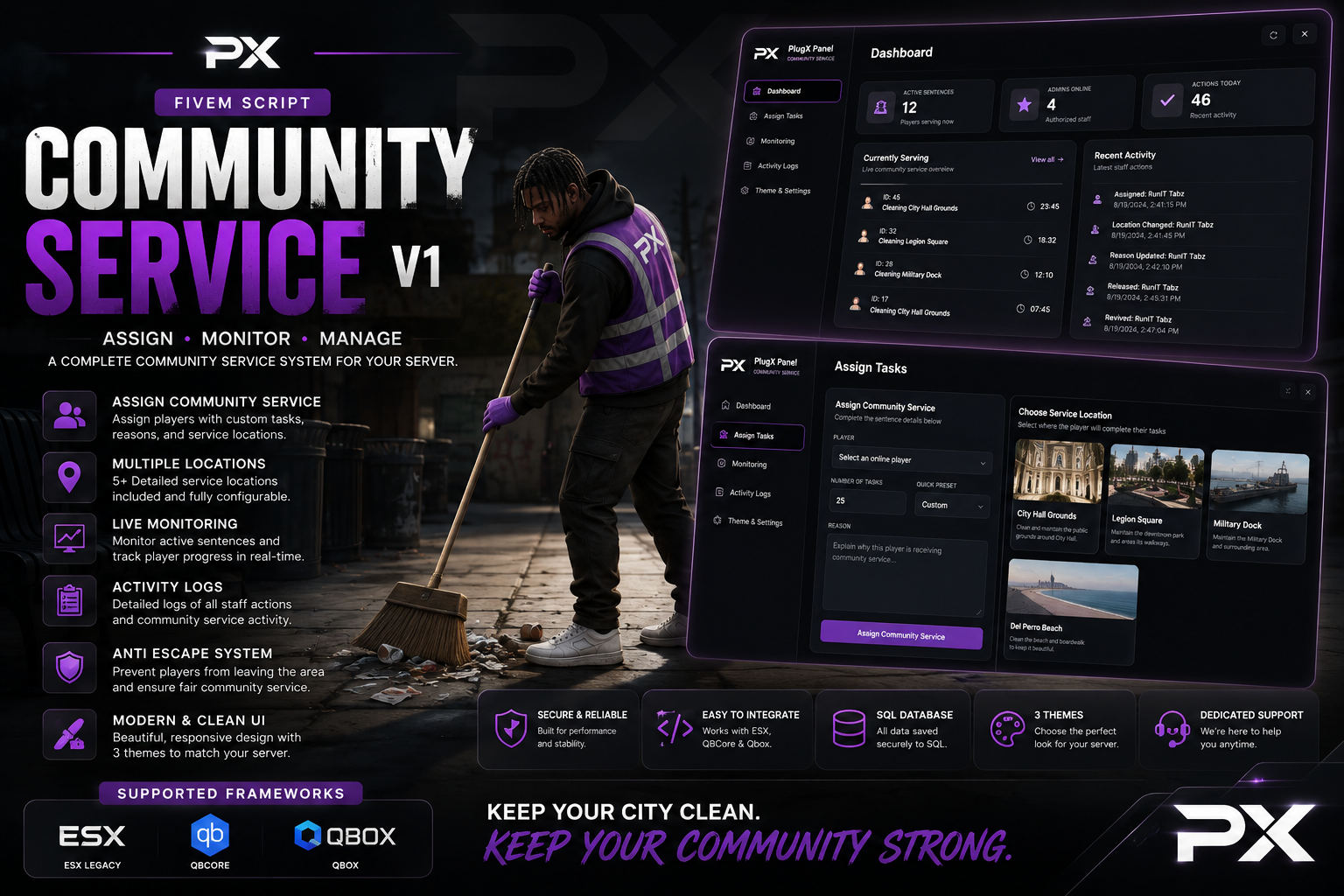
Community Service V1






Community Service V1
Give your staff a faster, cleaner, and more professional way to manage player punishments with PlugX Community Service V1.
This complete FiveM community service system combines a modern PlugX-style administration panel, useful staff commands, SQL persistence, live player monitoring, detailed activity logs, customizable branding, and a powerful anti-escape system.
PlugX Community Service V1 supports ESX, QBCore, and Qbox, allowing server owners to select their framework directly inside the configuration file.
Modern Administration Panel
Authorized staff members can open the community service panel using:
-
/comservpanel -
The configurable F11 keybind
The panel is protected through configurable ACE permissions and supported framework administration groups.
From one interface, staff can assign sentences, monitor active players, review activity, revive players, release players, and customize the appearance of the panel.
Dashboard Overview
The Dashboard gives staff a quick overview of the community service system, including:
-
Number of active community service sentences
-
Number of authorized administrators online
-
Number of recent staff actions
-
Players currently serving
-
Recent community service activity
Dashboard statistics, icons, highlights, and scrollbars automatically match the selected interface color.
Assign Community Service Tasks
The Assign Tasks page makes sentencing players quick and straightforward.
Staff can:
-
Select an online player
-
Enter the number of required tasks
-
Choose a quick task preset
-
Enter the reason for the punishment
-
Select a community service location
-
Review a picture and description of each location
The resource includes three configurable service locations:
-
City Hall Grounds
-
Legion Square
-
Vespucci Beach
Every location includes its own image, spawn position, service zone, and multiple task points. Server owners can replace the included PNG preview images and configure completely different locations if needed.
When a sentence is assigned, the player’s current position is saved before they are transported to community service.
Player Service Display
Players serving community service receive a clean on-screen display showing:
-
Player name
-
Reason for the punishment
-
Remaining task count
-
Overall task progress
The player is guided toward their current task using a configurable minimap blip and optional GPS route.
Once every task has been completed, the player is automatically removed from community service and returned to the location they were standing at before their sentence began.
Live Player Monitoring
The Live Monitoring page allows staff members to view every player currently serving community service.
Staff can:
-
View the player’s remaining and total tasks
-
See which administrator assigned the sentence
-
Check the selected service location
-
Spectate the player
-
Revive the player
-
Release the player early
The release option includes a styled in-panel Confirm or Cancel window, helping prevent accidental releases without opening another page or using a browser confirmation popup.
Spectate, Revive, and Release
Staff can spectate active players directly from the monitoring panel to make sure they are completing their sentence correctly.
The revive option supports the selected ESX, QBCore, or Qbox framework and includes a native FiveM resurrection fallback. Servers using a custom ambulance system can also adjust the revive event.
Releasing a player early immediately ends their sentence and returns them to their saved position.
Detailed Activity Logs
Every important community service action is recorded for staff review.
The Activity Logs page tracks:
-
Community service assignments
-
Completed sentences
-
Manual releases
-
Player revives
-
Escape attempts
-
Player name
-
Administrator name
-
Punishment reason
-
Date and time
Logs can be filtered by activity type, making it easier for management teams to review punishments and staff actions.
Automatic completions and escape attempts are attributed to the system, console commands are identified as console actions, and panel actions are connected to the correct administrator.
Custom Theme Color Picker
The Theme and Settings page includes a complete color picker instead of limiting administrators to preset themes.
Admins can:
-
Select any custom accent color
-
Enter a six-digit hex color
-
Preview the color live
-
Save their personal color
-
Reset back to the server default
The selected color updates:
-
Navigation highlights
-
Dashboard statistic icons
-
Buttons
-
Progress indicators
-
Service display
-
Scrollbars
-
Active interface elements
Server owners can configure any default hex color inside config.lua.
Replaceable Server Branding
PlugX Community Service V1 can be customized to match your server.
Owners can change:
-
Server logo
-
Server name
-
Panel subtitle
-
Default theme color
-
Location preview images
The server name can also be hidden for a clean, logo-only panel header.
Anti-Escape and Protection System
The built-in Anti-Escape System prevents players from avoiding their sentence.
While serving community service, the resource can:
-
Disable combat
-
Block weapon usage
-
Disable inventory access
-
Prevent PvP
-
Detect players leaving the service zone
-
Teleport escaping players back
-
Display an escape notification
-
Record escape attempts in the activity logs
The zone radius and escape buffer are fully configurable for each server setup.
SQL Persistence
Community service sentences are stored using SQL.
If a player disconnects, reconnects, or the resource restarts, their unfinished sentence can be restored. Completed task progress is automatically saved to help prevent players from avoiding punishments by leaving the server.
Included Commands
-
/comserv [id] [tasks] [reason]— Assign community service -
/comservend [id]— Release a player early -
/comservrevive [id]— Revive a serving player -
/comservpanel— Open the administration panel
Commands include usage examples and optional FiveM chat suggestions that explain each required argument while staff members type.
Configuration Options
Server owners can configure:
-
Framework selection
-
Admin groups and ACE permissions
-
Panel command and keybind
-
Server branding
-
Default interface color
-
Maximum task amount
-
Task duration
-
Interaction and drawing distance
-
Service zone radius
-
Escape buffer
-
Automatic saving
-
Combat and inventory restrictions
-
Revive on assignment
-
Notification position
-
TextUI position
-
Minimap blip and GPS route
-
Service locations and task coordinates
-
Location names, descriptions, and images
-
Notification text
Framework Support
-
ESX
-
QBCore
-
Qbox
Requirements
-
ox_lib -
oxmysql -
MySQL or MariaDB
-
One supported framework
What You Receive
Your purchase includes:
-
PlugX Community Service V1 resource
-
Complete administration NUI
-
ESX, QBCore, and Qbox framework bridge
-
SQL installation file
-
Configurable service locations
-
PNG location preview images
-
Replaceable server logo
-
Detailed configuration file
-
Installation and command documentation
Bring better punishment management, stronger staff oversight, and a professional PlugX-style interface to your FiveM server with PlugX Community Service V1.
Preview Coming Soon!
Tags: ESX, QBCore, QBox, Standalone
Our support team is available 24/7 on Discord to assist you with any questions.
Join Discord 24/7 Community SupportYour purchase is delivered automatically right after checkout. No waiting.
All transactions are processed through Tebex with enterprise-grade encryption.
Get all future updates and improvements included with your purchase at no extra cost.
Send as a Gift

Gift Community Service V1 and have it sent directly to their CFX.re account, so you don't have to transfer it after purchase.
Your cart is empty. Browse our store to find something you'll love.
Browse Products