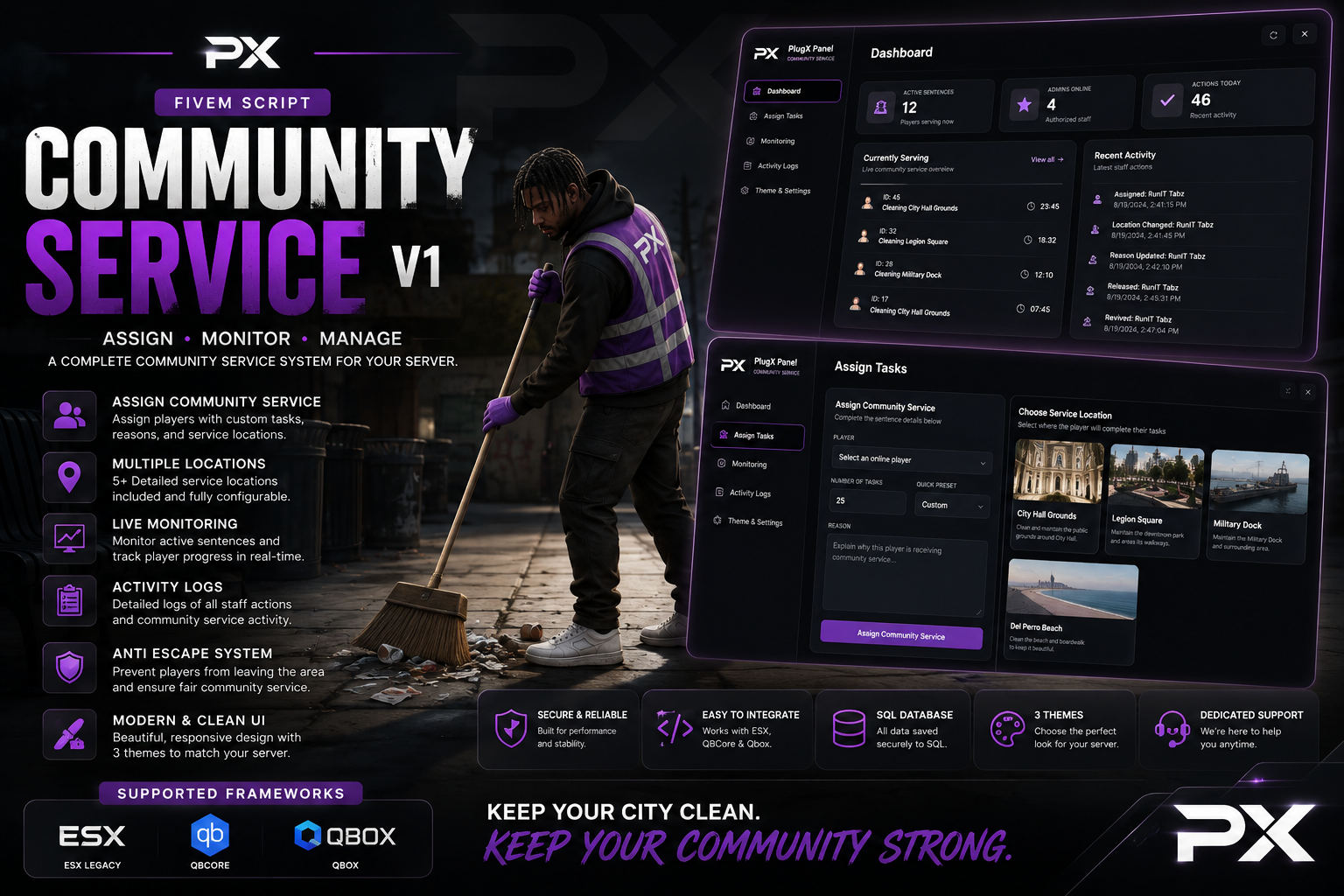
Give your staff a faster, cleaner, and more professional way to manage player punishments with PlugX Community Service V1.
This complete FiveM community service system combines a modern PlugX-style administration panel, useful staff commands, SQL persistence, live player monitoring, detailed activity logs, customizable branding, and a powerful anti-escape system.
PlugX Community Service V1 supports ESX, QBCore, and Qbox, allowing server owners to select their framework directly inside the configuration file.
Modern Administration Panel
Authorized staff members can open the community service panel using:
/comservpanel
The configurable F11 keybind
The panel is protected through configurable ACE permissions and supported framework administration groups.
From one interface, staff can assign sentences, monitor active players, review activity, revive players, release players, and customize the appearance of the panel.
Dashboard Overview
The Dashboard gives staff a quick overview of the community service system, including:
Number of active community service sentences
Number of authorized administrators online
Number of recent staff actions
Players currently serving
Recent community service activity
Dashboard statistics, icons, highlights, and scrollbars automatically match the selected interface color.
Assign Community Service Tasks
The Assign Tasks page makes sentencing players quick and straightforward.
Staff can:
Select an online player
Enter the number of required tasks
Choose a quick task preset
Enter the reason for the punishment
Select a community service location
Review a picture and description of each location
The resource includes three configurable service locations:
City Hall Grounds
Legion Square
Vespucci Beach
Every location includes its own image, spawn position, service zone, and multiple task points. Server owners can replace the included PNG preview images and configure completely different locations if needed.
When a sentence is assigned, the player’s current position is saved before they are transported to community service.
Player Service Display
Players serving community service receive a clean on-screen display showing:
Player name
Reason for the punishment
Remaining task count
Overall task progress
The player is guided toward their current task using a configurable minimap blip and optional GPS route.
Once every task has been completed, the player is automatically removed from community service and returned to the location they were standing at before their sentence began.
Live Player Monitoring
The Live Monitoring page allows staff members to view every player currently serving community service.
Staff can:
View the player’s remaining and total tasks
See which administrator assigned the sentence
Check the selected service location
Spectate the player
Revive the player
Release the player early
The release option includes a styled in-panel Confirm or Cancel window, helping prevent accidental releases without opening another page or using a browser confirmation popup.
Spectate, Revive, and Release
Staff can spectate active players directly from the monitoring panel to make sure they are completing their sentence correctly.
The revive option supports the selected ESX, QBCore, or Qbox framework and includes a native FiveM resurrection fallback. Servers using a custom ambulance system can also adjust the revive event.
Releasing a player early immediately ends their sentence and returns them to their saved position.
Detailed Activity Logs
Every important community service action is recorded for staff review.
The Activity Logs page tracks:
Community service assignments
Completed sentences
Manual releases
Player revives
Escape attempts
Player name
Administrator name
Punishment reason
Date and time
Logs can be filtered by activity type, making it easier for management teams to review punishments and staff actions.
Automatic completions and escape attempts are attributed to the system, console commands are identified as console actions, and panel actions are connected to the correct administrator.
Custom Theme Color Picker
The Theme and Settings page includes a complete color picker instead of limiting administrators to preset themes.
Admins can:
Select any custom accent color
Enter a six-digit hex color
Preview the color live
Save their personal color
Reset back to the server default
The selected color updates:
Navigation highlights
Dashboard statistic icons
Buttons
Progress indicators
Service display
Scrollbars
Active interface elements
Server owners can configure any default hex color inside config.lua.
Replaceable Server Branding
PlugX Community Service V1 can be customized to match your server.
Owners can change:
Server logo
Server name
Panel subtitle
Default theme color
Location preview images
The server name can also be hidden for a clean, logo-only panel header.
Anti-Escape and Protection System
The built-in Anti-Escape System prevents players from avoiding their sentence.
While serving community service, the resource can:
Disable combat
Block weapon usage
Disable inventory access
Prevent PvP
Detect players leaving the service zone
Teleport escaping players back
Display an escape notification
Record escape attempts in the activity logs
The zone radius and escape buffer are fully configurable for each server setup.
SQL Persistence
Community service sentences are stored using SQL.
If a player disconnects, reconnects, or the resource restarts, their unfinished sentence can be restored. Completed task progress is automatically saved to help prevent players from avoiding punishments by leaving the server.
Included Commands
/comserv [id] [tasks] [reason] — Assign community service
/comservend [id] — Release a player early
/comservrevive [id] — Revive a serving player
/comservpanel — Open the administration panel
Commands include usage examples and optional FiveM chat suggestions that explain each required argument while staff members type.
Configuration Options
Server owners can configure:
Framework selection
Admin groups and ACE permissions
Panel command and keybind
Server branding
Default interface color
Maximum task amount
Task duration
Interaction and drawing distance
Service zone radius
Escape buffer
Automatic saving
Combat and inventory restrictions
Revive on assignment
Notification position
TextUI position
Minimap blip and GPS route
Service locations and task coordinates
Location names, descriptions, and images
Notification text
Framework Support
ESX
QBCore
Qbox
Requirements
ox_lib
oxmysql
MySQL or MariaDB
One supported framework
What You Receive
Your purchase includes:
PlugX Community Service V1 resource
Complete administration NUI
ESX, QBCore, and Qbox framework bridge
SQL installation file
Configurable service locations
PNG location preview images
Replaceable server logo
Detailed configuration file
Installation and command documentation
Bring better punishment management, stronger staff oversight, and a professional PlugX-style interface to your FiveM server with PlugX Community Service V1.
Enhance player engagement and reward your community with Giveaway Creator V1, a premium giveaway management resource developed exclusively for FiveM. Designed with modern communities in mind, this resource provides server owners and staff with a streamlined way to create, manage, and distribute giveaways through a polished and intuitive interface.
Whether you're hosting daily rewards, server milestone events, holiday promotions, VIP giveaways, or exclusive community competitions, Giveaway Creator V1 offers a reliable and professional solution that integrates seamlessly into your server.
Built with Performance, Usability, and Customization as its foundation, Giveaway Creator V1 utilizes OX Inventory and OX Lib to provide a smooth administrative workflow while delivering an exceptional experience for your players.
Key Features
Modern Giveaway Management
Create and manage unlimited giveaways through an elegant, responsive NUI designed specifically for FiveM.
Administrators can configure:
Custom Giveaway Titles
Reward Descriptions
Prize Items
Prize Quantities
Giveaway Duration
Giveaway Status
Host Information
Winner Selection
Giveaway Management
Everything can be managed through a clean interface without requiring players or staff to navigate complex commands.
Player-Friendly Experience
Players have access to an organized giveaway menu where they can:
Browse Active Giveaways
View Giveaway Details
Enter Eligible Giveaways
Track their Giveaway Entries
Remaining Giveaway Time
Receive Notifications
The interface has been designed to provide a modern experience while remaining simple and intuitive for all players.
Automatic Winner Selection
When a giveaway concludes, Giveaway Creator V1 can automatically:
Select a Random Winner
Giveaway is over
Notify the Winner
Display Giveaway Information
Prevents Duplicate Entries
This allows server staff to spend less time managing events and more time interacting with the community.
OX Inventory Integration
Giveaway Creator V1 integrates directly with OX Inventory, allowing administrators to quickly select rewards from the server's available items.
Features include:
Auto-Loads items
Searchable item Selection
Prize Quantity Support
Inventory Rewards
Money Reward Support
Optimized Performance
The resource automatically detects available items and simplifies reward configuration during giveaway creation.
OX Lib Notifications
Professional notifications powered by OX Lib provide real-time feedback for both players and administrators.
Notification events include:
Giveaway Creation
Giveaway Entry Confirmation
Giveaway Completion
Winner Announcements
Reward Distribution
Administrative Actions
Notifications are designed to remain informative without interrupting gameplay.
Premium User Interface
Giveaway Creator V1 features a professionally designed interface built around modern UI principles.
Highlights include:
Responsive Layout
Clean Dark Theme
Smooth Animations
Sidebar Navigation
Active Giveaway Tracking
Countdown Timers
Modern Card Layouts
Optimized Responsiveness
High-Quality Iconography
The interface is designed to complement professional FiveM servers while maintaining excellent usability.
Performance Optimized
Performance has been prioritized throughout development.
The resource has been built to deliver:
Low Resource Usage
Efficient Client & Server
Optimized Lua Scripting
Lightweight NUI
Fast Loading Times
Stable Under Heavy Usage
Whether your community has a few dozen players or several hundred, Giveaway Creator V1 is designed to remain responsive and reliable.
Included Functionality
Giveaway Management
Create, edit, manage, and monitor active giveaways through an easy-to-use administrative interface.
Active Giveaways
Players can browse currently active giveaways with live information including prizes, entries, hosts, and remaining time.
Player Entries
Allows eligible players to participate in active giveaways with a single interaction.
Winner Management
Automatically records completed giveaways and selected winners for easy reference.
Administrative Controls
Provides staff with efficient tools for creating, managing, and concluding giveaways.
Compatibility
Giveaway Creator V1 is designed to integrate with modern FiveM servers.
PlugX KillFeed V1 is a lightweight and clean FiveM kill notification system built to give players instant feedback whenever they eliminate another player or get eliminated themselves.
Using ox_lib notifications, the script provides simple, responsive kill and death alerts without requiring a large NUI or unnecessary resource usage. It is designed to be easy to configure, easy to install, and simple for server owners to customize.
Features
Kill confirmation notifications
Death notifications
Displays the killer's server ID
Displays the victim's server ID
Shows the distance between killer and victim
Uses ox_lib notifications
Lightweight performance
Duplicate death protection
Automatically resets after revive or respawn
Configurable debug system
Built-in notification testing command
Fully editable configuration
Simple installation
Test Notification System
Server owners can enable or completely disable the testing command through the config.
Config.TestNotifications = true
When enabled, staff/developers can use:
/testkillfeed
This will display example kill and death notifications so you can preview the system without needing another player.
Setting it to:
Config.TestNotifications = false
completely disables the command.
Debug Mode
PlugX KillFeed V1 also includes a configurable debug system to help server owners troubleshoot the resource.
Config.Debug = true
When enabled, the console will display useful information such as:
Death detected: true / false
Killer detected: true / false
Valid PvP kill: true / false
Kill report sent: true / false
Killer notification sent: true / false
Victim notification sent: true / false
Test command registered: true / false
This makes it much easier to identify exactly where something may not be working correctly.
Requirements
ox_lib
Example Notifications
Kill Confirmed 🎯
You Killed ID 12 (34m)
You Died 💀
Killed by ID 7 (34m)
Why PlugX KillFeed?
PlugX KillFeed V1 is made for server owners who want a simple and professional kill notification system without adding a large killfeed UI to their server.
It is perfect for:
Redzone servers
PvP servers
100K or Die servers
Freeroam servers
Deathmatch servers
Gang servers
Competitive FiveM servers
Clean, lightweight, configurable, and ready to drop into your server.
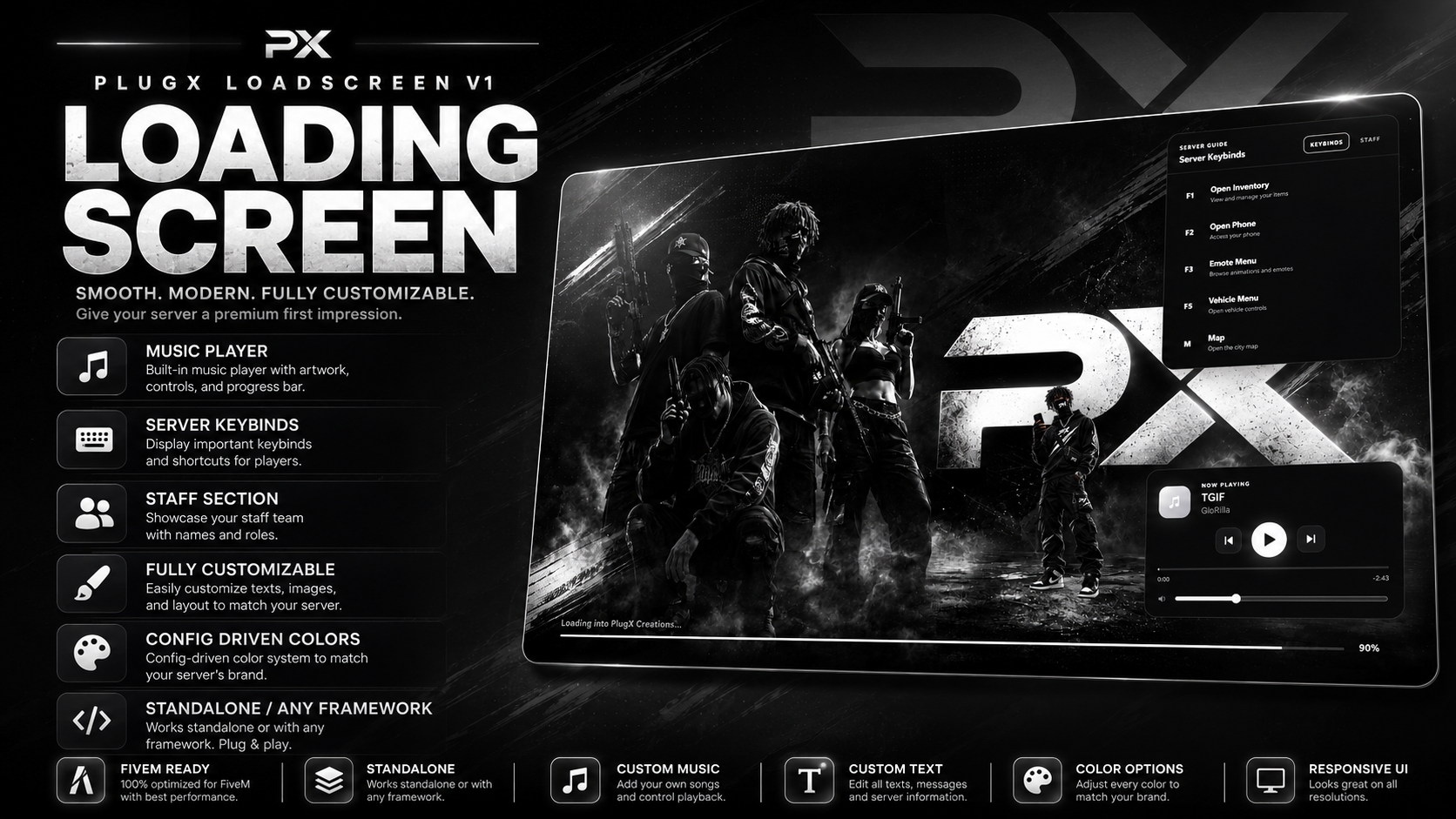
Give your FiveM server a clean, modern first impression with PlugX Loadscreen V1.
This loading screen was designed to give server owners a polished interface while keeping customization simple. Instead of digging through multiple HTML, CSS, or JavaScript files every time you want to change your server name, colors, keybinds, music, or staff information, the important settings are handled directly through the included config.lua.
Whether you're running ESX, QBCore, Qbox, or a completely custom framework, PlugX Loadscreen V1 is built to work standalone.
What You're Receiving
When you purchase PlugX Loadscreen V1, you will receive the complete FiveM resource ready to install on your server.
The package includes:
Complete FiveM loading screen resource
fxmanifest.lua
Fully configurable config.lua
Loading screen HTML interface
CSS styling files
JavaScript functionality
Music player system
MP3 playlist support
Server keybind section
Staff showcase section
Custom loading progress bar
Loading percentage display
Configurable server information
Config-driven color system
Character/image support
Installation instructions
Ready-to-use resource structure
You are receiving the files required to install and run the loading screen on your FiveM server.
Standalone Framework Support
PlugX Loadscreen V1 does not require a specific framework.
It can be used with:
ESX
QBCore
Qbox
Custom frameworks
Standalone servers
There are no framework-specific dependencies required just to use the loading screen.
Simply install the resource and configure it for your server.
Custom Music Player
The loading screen includes a built-in music player designed to give players something to listen to while joining your server.
You can add your own .mp3 files directly to the resource and configure them through config.lua.
The player includes:
MP3 playback
Play and pause controls
Previous track
Next track
Volume control
Multiple-song playlist support
Configurable starting volume
Autoplay support
Shuffle option
Current song title
Artist display
Elapsed song time
Remaining song time
Seekable music progress bar
The music timeline gives players an experience similar to a modern music player.
Example:
0:42 ━━━━━━━━━●━━━━━━━━ -2:18
Players can see how long the song has been playing and how much time remains.
Server Keybind Guide
Help new players learn your server before they even finish connecting.
The built-in Server Guide allows you to display important keybinds directly on the loading screen.
Examples include:
F1 — Open Inventory
F2 — Open Phone
F3 — Emote Menu
F5 — Vehicle Menu
M — Open Map
Every keybind can be customized through config.lua.
You can change:
Key
Feature name
Description
This is especially useful for servers with custom menus or controls that new players may not immediately know.
Staff Section
PlugX Loadscreen V1 also includes a configurable Staff Section.
Use this area to introduce your server team while players are connecting.
You can display information such as:
Staff member name
Staff role
Owner
Management
Administrator
Moderator
Developer
Custom staff positions
Optional profile images can also be configured.
If you don't want to use images, the interface can display staff information without requiring custom portraits.
Config-Driven Customization
One of the main features of PlugX Loadscreen V1 is the centralized configuration system.
Most common customization can be handled directly through:
config.lua
You can configure things such as:
Server name
Server tagline
Loading text
Background image
Background darkness
Background blur
Main accent color
Panel colors
Text colors
Play button color
Progress bar colors
Music player position
Server Guide position
Server Guide width
Music player width
Staff information
Server keybinds
Music playlist
Music volume
Music autoplay
Music shuffle
Character image
Character position
You should not need to constantly edit the CSS or JavaScript for normal server customization.
Fully Customizable Colors
The loading screen includes a config-driven theme system.
You can customize the interface to match your server branding.
Color options include:
Primary color
Secondary color
Background color
Music player background
Server Guide background
Panel border color
Main text
Muted text
Play button color
Loading bar track
Loading bar glow
Overlay color
Shadow color
Control button surfaces
Background accents
This makes it easy to create themes such as:
Black and white
Purple and black
Red and black
Blue and white
Green and black
Custom server branding
Loading Progress System
The loading screen includes a bottom loading bar designed to visually show players their connection progress.
The system includes:
Loading progress bar
Loading percentage
Configurable loading text
Server loading message
Smooth progress updates
Example:
Loading into Your Server... 87%
This gives players a cleaner alternative to relying only on FiveM's default loading interface.
Custom Background Support
Use your own server artwork as the loading screen background.
Simply replace the configured background image and update the appropriate setting.
This allows you to use:
Server artwork
Character artwork
Gang/server promotional images
City screenshots
Custom branding
Clan artwork
Black-and-white designs
Full-color designs
Background darkness and blur can also be adjusted through the configuration.
Character Support
The resource includes support for an additional transparent character image.
This character can be positioned beside the music player or elsewhere depending on your preferred layout.
You can configure:
Character enabled/disabled
Character image
Width
Bottom position
Right position
This allows you to personalize the loading screen even further with your own server character or branding artwork.
Clean & Modern Interface
PlugX Loadscreen V1 was designed around a simple modern layout.
The interface includes:
Clean card design
Modern typography
Smooth spacing
Music controls
Server information
Server Guide
Staff information
Progress indicators
Custom server branding
The design is made to keep important information readable without overcrowding the screen.
Easy Installation
Installation is simple.
After downloading the resource:
Extract the provided ZIP file.
Place the resource folder inside your FiveM server's resources directory.
Open config.lua.
Configure your server information, colors, music, keybinds, and staff.
Add your own MP3 files to the included music folder if desired.
Add your background and character images if desired.
Add the resource to your server.cfg.
Example:
ensure PlugX-LoadscreenV1
Restart your server and reconnect to view the loading screen.
How You Will Receive Your Purchase
After your payment has been successfully completed through Tebex, you will receive access to the downloadable PlugX Loadscreen V1 package associated with your purchase.
The download contains the FiveM resource files needed to install the loading screen.
After receiving the files:
Download the package from your purchase.
Extract the ZIP file.
Upload the resource to your FiveM server.
Configure config.lua.
Add your music/images if desired.
Add the resource to server.cfg.
Restart your server.
There is no physical item shipped.
This is a digital FiveM resource.
Your Own Music
Music is not something you are locked into.
You can add your own MP3 tracks directly to the resource.
Simply place your MP3 files inside the music folder and add the track information inside config.lua.
This allows you to completely customize the soundtrack players hear while joining your server.
You are responsible for making sure you have permission to use any music you add to your server.
Perfect For
PlugX Loadscreen V1 is ideal for:
FiveM roleplay servers
Freeroam servers
PvP servers
Redzone servers
Gang servers
Economy servers
Serious RP servers
Community servers
New FiveM projects
Existing servers wanting a UI upgrade
Why PlugX Loadscreen V1?
Instead of giving players a basic loading screen, PlugX Loadscreen V1 gives you a complete introduction to your server.
Players can see your branding, listen to music, learn important keybinds, view your staff team, and monitor their loading progress all from one interface.
Main Features
Standalone resource
Works with any framework
Built-in MP3 music player
Multiple music tracks
Play/pause controls
Previous/next controls
Volume control
Music progress timeline
Elapsed and remaining song time
Seekable music bar
Server keybind guide
Staff section
Configurable server name
Configurable server tagline
Configurable loading text
Custom background support
Character image support
Bottom loading progress bar
Loading percentage
Config-driven colors
Dedicated play button color
Custom panel colors
Configurable UI positioning
Easy installation
Modern black/grey/white-friendly design
No framework dependency
Important Information
This product is a digital FiveM resource.
You will need access to your FiveM server files in order to install it.
Basic knowledge of uploading resources and editing a config.lua file is recommended.
The loading screen is designed to be customized for your own server, so example server names, keybinds, songs, staff names, backgrounds, or other demonstration content may need to be replaced with your own information.
PlugX Creations
Premium FiveM resources built to make your server stand out.
Texture Pack V1 is built for creators who want complete freedom when designing custom weapons. Featuring a collection of high-quality PlugX textures, this pack provides everything you need to create, edit, and customize unique weapon designs for your projects.
Whether you’re developing content for your FiveM server, creating personal projects, or building your own texture packs, Texture Pack V1 offers a professional foundation with over 50 ready-to-use weapon textures.
📦 Included in Texture Pack V1
50+ Custom Weapon Textures
Multiple Camo & Pattern Variations
Carbon Fiber Style Textures
Digital Camo Textures
Blue Lightning Textures
Red Lightning Textures
Galaxy Style Textures
Neon & Glow Style Textures
Abstract Weapon Finishes
High-Quality PNG Texture Files
Easy-to-Edit Texture Assets
Access to Future Texture Pack Updates
Exclusive Discord Customer Role
🎭 Texture Examples
This pack includes a variety of texture styles such as:
Carbon Fiber
Blue Lightning
Red Lightning
Digital Camo
Galaxy
Neon
Abstract Weapon Finishes
Additional Exclusive PlugX Texture Designs
⚠️ The exact textures included are demonstrated in the product preview video and screenshots provided on this product page.
Why Choose Texture Pack V1?
Designed by PlugX Creations, this pack gives creators access to professionally crafted textures that can be used as a starting point for building completely custom weapon designs. Save time, improve quality, and bring your ideas to life with a collection made specifically for the FiveM community.
⚠️ Important Information
Texture Pack V1 is exclusively available through PlugX Creations and is not sold anywhere else. By purchasing this pack, you will automatically receive access to future updates released for Texture Pack V1.
Community & Support
Need help or want to stay updated on future releases? Join our Discord community for support, announcements, exclusive previews, and customer-only content.
Take full control of organized server wars with PlugX WarAdmin V1, a complete war-management system designed for servers that want structured team battles without forcing staff to manage everything manually.
WarAdmin V1 gives your staff a modern in-game control panel where they can create war lobbies, assign players to teams, configure team spawn points, select loadouts, start and end wars, revive rounds, monitor player performance, and review completed war results.
What You're Receiving
Your purchase includes the complete PlugX WarAdmin V1 resource with support for:
ESX
QBCore
Qbox
ox_inventory
ox_lib
oxmysql
Optional Wasabi Ambulance revive integration
Key Features
War Lobby Management
Create and manage separate war lobbies directly from the admin interface.
Configurable Teams
Create your own team names, colors, and labels through config.lua.
Player & Team Assignment
Add players using their Server ID or quickly select the closest player, then assign them to a team.
Team-Specific Spawn Points
Save separate spawn locations for each team on every war lobby. Players are automatically returned to their team spawn when a war begins or a round resets.
Configurable War Loadouts
Choose which weapons, ammunition, armor, health, and items players receive during each war.
ox_inventory Integration
Temporary war weapons are handled separately from a player's normal inventory and can automatically be removed once the war finishes.
Live K/D Tracking
Track every player's kills and deaths while also viewing live team statistics.
Automatic Spectating
When a player dies, they can automatically spectate surviving teammates while a custom SPECTATING HUD displays who they're watching.
War Zone Enforcement
Players cannot simply run away from the configured war area. Leaving the zone automatically places them back inside the boundary and sends them a warning.
Round Revive System
Reset the fight once the round is nearly finished without needing to wait for the final surviving player to die.
War History & Results
Completed wars are stored in SQL, allowing staff to view previous matches, winners, team results, player K/D statistics, war duration, and more.
Configurable Notifications
Choose where ox_lib notifications appear, including:
Top
Top Left
Top Right
Center Left
Center Right
Bottom
Bottom Left
Bottom Right
Customizable UI
Change the main WarAdmin accent color directly through config.lua to better match your server's branding.
How You Receive Your Purchase
After purchasing PlugX WarAdmin V1, you will receive access to the complete resource package through your purchase/order delivery.
The package includes the resource files, configuration files, SQL files, and everything needed to begin installing WarAdmin on your server.
Full installation instructions and configuration information are also available through the PlugX Creations Documentation, making setup easy even if you're installing the resource for the first time.
Built for Server Owners
WarAdmin V1 was designed to give server owners a powerful system without locking everything behind hard-coded settings. Teams, colors, loadouts, framework selection, notifications, revive options, permissions, UI styling, and many other features can be configured to fit your server.
Create the lobby. Assign the teams. Start the war. Track the winner.