
Loadingscreen V1






Loadingscreen V1
Give your FiveM server a clean, modern first impression with PlugX Loadscreen V1.
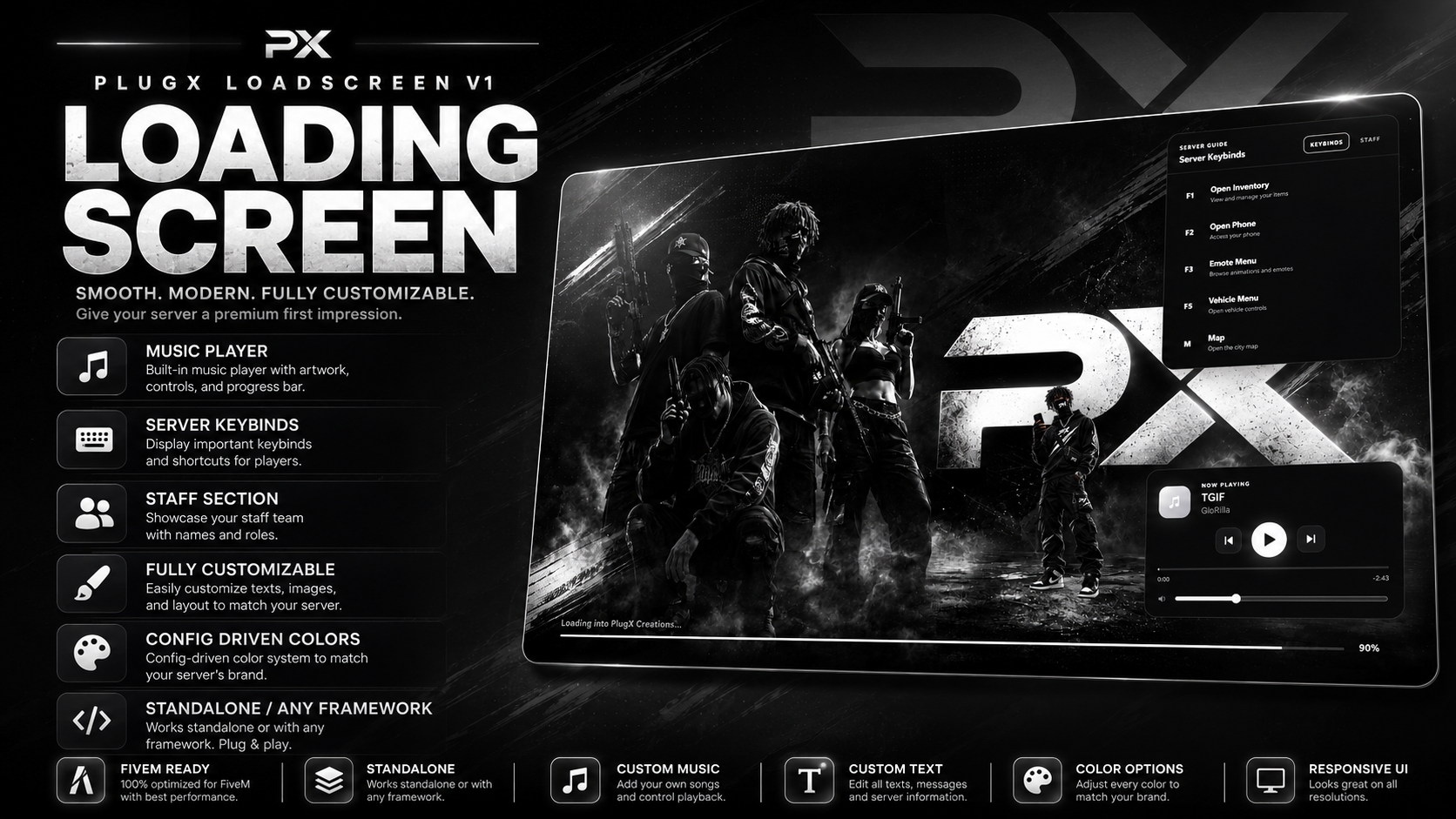
This loading screen was designed to give server owners a polished interface while keeping customization simple. Instead of digging through multiple HTML, CSS, or JavaScript files every time you want to change your server name, colors, keybinds, music, or staff information, the important settings are handled directly through the included config.lua.
Whether you're running ESX, QBCore, Qbox, or a completely custom framework, PlugX Loadscreen V1 is built to work standalone.
What You're Receiving
When you purchase PlugX Loadscreen V1, you will receive the complete FiveM resource ready to install on your server.
The package includes:
- Complete FiveM loading screen resource
-
fxmanifest.lua - Fully configurable
config.lua - Loading screen HTML interface
- CSS styling files
- JavaScript functionality
- Music player system
- MP3 playlist support
- Server keybind section
- Staff showcase section
- Custom loading progress bar
- Loading percentage display
- Configurable server information
- Config-driven color system
- Character/image support
- Installation instructions
- Ready-to-use resource structure
You are receiving the files required to install and run the loading screen on your FiveM server.
Standalone Framework Support
PlugX Loadscreen V1 does not require a specific framework.
It can be used with:
- ESX
- QBCore
- Qbox
- Custom frameworks
- Standalone servers
There are no framework-specific dependencies required just to use the loading screen.
Simply install the resource and configure it for your server.
Custom Music Player
The loading screen includes a built-in music player designed to give players something to listen to while joining your server.
You can add your own .mp3 files directly to the resource and configure them through config.lua.
The player includes:
- MP3 playback
- Play and pause controls
- Previous track
- Next track
- Volume control
- Multiple-song playlist support
- Configurable starting volume
- Autoplay support
- Shuffle option
- Current song title
- Artist display
- Elapsed song time
- Remaining song time
- Seekable music progress bar
The music timeline gives players an experience similar to a modern music player.
Example:
0:42 ━━━━━━━━━●━━━━━━━━ -2:18
Players can see how long the song has been playing and how much time remains.
Server Keybind Guide
Help new players learn your server before they even finish connecting.
The built-in Server Guide allows you to display important keybinds directly on the loading screen.
Examples include:
-
F1— Open Inventory -
F2— Open Phone -
F3— Emote Menu -
F5— Vehicle Menu -
M— Open Map
Every keybind can be customized through config.lua.
You can change:
- Key
- Feature name
- Description
This is especially useful for servers with custom menus or controls that new players may not immediately know.
Staff Section
PlugX Loadscreen V1 also includes a configurable Staff Section.
Use this area to introduce your server team while players are connecting.
You can display information such as:
- Staff member name
- Staff role
- Owner
- Management
- Administrator
- Moderator
- Developer
- Custom staff positions
Optional profile images can also be configured.
If you don't want to use images, the interface can display staff information without requiring custom portraits.
Config-Driven Customization
One of the main features of PlugX Loadscreen V1 is the centralized configuration system.
Most common customization can be handled directly through:
config.lua
You can configure things such as:
- Server name
- Server tagline
- Loading text
- Background image
- Background darkness
- Background blur
- Main accent color
- Panel colors
- Text colors
- Play button color
- Progress bar colors
- Music player position
- Server Guide position
- Server Guide width
- Music player width
- Staff information
- Server keybinds
- Music playlist
- Music volume
- Music autoplay
- Music shuffle
- Character image
- Character position
You should not need to constantly edit the CSS or JavaScript for normal server customization.
Fully Customizable Colors
The loading screen includes a config-driven theme system.
You can customize the interface to match your server branding.
Color options include:
- Primary color
- Secondary color
- Background color
- Music player background
- Server Guide background
- Panel border color
- Main text
- Muted text
- Play button color
- Loading bar track
- Loading bar glow
- Overlay color
- Shadow color
- Control button surfaces
- Background accents
This makes it easy to create themes such as:
- Black and white
- Purple and black
- Red and black
- Blue and white
- Green and black
- Custom server branding
Loading Progress System
The loading screen includes a bottom loading bar designed to visually show players their connection progress.
The system includes:
- Loading progress bar
- Loading percentage
- Configurable loading text
- Server loading message
- Smooth progress updates
Example:
Loading into Your Server... 87%
This gives players a cleaner alternative to relying only on FiveM's default loading interface.
Custom Background Support
Use your own server artwork as the loading screen background.
Simply replace the configured background image and update the appropriate setting.
This allows you to use:
- Server artwork
- Character artwork
- Gang/server promotional images
- City screenshots
- Custom branding
- Clan artwork
- Black-and-white designs
- Full-color designs
Background darkness and blur can also be adjusted through the configuration.
Character Support
The resource includes support for an additional transparent character image.
This character can be positioned beside the music player or elsewhere depending on your preferred layout.
You can configure:
- Character enabled/disabled
- Character image
- Width
- Bottom position
- Right position
This allows you to personalize the loading screen even further with your own server character or branding artwork.
Clean & Modern Interface
PlugX Loadscreen V1 was designed around a simple modern layout.
The interface includes:
- Clean card design
- Modern typography
- Smooth spacing
- Music controls
- Server information
- Server Guide
- Staff information
- Progress indicators
- Custom server branding
The design is made to keep important information readable without overcrowding the screen.
Easy Installation
Installation is simple.
After downloading the resource:
- Extract the provided ZIP file.
- Place the resource folder inside your FiveM server's
resourcesdirectory. - Open
config.lua. - Configure your server information, colors, music, keybinds, and staff.
- Add your own MP3 files to the included music folder if desired.
- Add your background and character images if desired.
- Add the resource to your
server.cfg.
Example:
ensure PlugX-LoadscreenV1
Restart your server and reconnect to view the loading screen.
How You Will Receive Your Purchase
After your payment has been successfully completed through Tebex, you will receive access to the downloadable PlugX Loadscreen V1 package associated with your purchase.
The download contains the FiveM resource files needed to install the loading screen.
After receiving the files:
- Download the package from your purchase.
- Extract the ZIP file.
- Upload the resource to your FiveM server.
- Configure
config.lua. - Add your music/images if desired.
- Add the resource to
server.cfg. - Restart your server.
There is no physical item shipped.
This is a digital FiveM resource.
Your Own Music
Music is not something you are locked into.
You can add your own MP3 tracks directly to the resource.
Simply place your MP3 files inside the music folder and add the track information inside config.lua.
This allows you to completely customize the soundtrack players hear while joining your server.
You are responsible for making sure you have permission to use any music you add to your server.
Perfect For
PlugX Loadscreen V1 is ideal for:
- FiveM roleplay servers
- Freeroam servers
- PvP servers
- Redzone servers
- Gang servers
- Economy servers
- Serious RP servers
- Community servers
- New FiveM projects
- Existing servers wanting a UI upgrade
Why PlugX Loadscreen V1?
Instead of giving players a basic loading screen, PlugX Loadscreen V1 gives you a complete introduction to your server.
Players can see your branding, listen to music, learn important keybinds, view your staff team, and monitor their loading progress all from one interface.
Main Features
- Standalone resource
- Works with any framework
- Built-in MP3 music player
- Multiple music tracks
- Play/pause controls
- Previous/next controls
- Volume control
- Music progress timeline
- Elapsed and remaining song time
- Seekable music bar
- Server keybind guide
- Staff section
- Configurable server name
- Configurable server tagline
- Configurable loading text
- Custom background support
- Character image support
- Bottom loading progress bar
- Loading percentage
- Config-driven colors
- Dedicated play button color
- Custom panel colors
- Configurable UI positioning
- Easy installation
- Modern black/grey/white-friendly design
- No framework dependency
Important Information
This product is a digital FiveM resource.
You will need access to your FiveM server files in order to install it.
Basic knowledge of uploading resources and editing a config.lua file is recommended.
The loading screen is designed to be customized for your own server, so example server names, keybinds, songs, staff names, backgrounds, or other demonstration content may need to be replaced with your own information.
PlugX Creations
Premium FiveM resources built to make your server stand out.
Customize it. Brand it. Make it yours.
Our support team is available 24/7 on Discord to assist you with any questions.
Join Discord 24/7 Community SupportYour purchase is delivered automatically right after checkout. No waiting.
All transactions are processed through Tebex with enterprise-grade encryption.
Get all future updates and improvements included with your purchase at no extra cost.
Send as a Gift

Gift Loadingscreen V1 and have it sent directly to their CFX.re account, so you don't have to transfer it after purchase.
Your cart is empty. Browse our store to find something you'll love.
Browse Products